
Custom Email Templates
Custom Email Templates
Roomzilla allows you to add custom text to email notifications, making it easy to provide users with additional details about reservations, directions, policies, or company information in the email footer. Whether you want to include special instructions for guests, office access rules, or a branded signature, this feature gives you full control over the communication your users receive.
To set up this feature, navigate to the Admin panel > Settings: General & Appearance> Email Customization.
Please note that this feature is exclusively available for accounts subscribed to the Business plan.
We’ve created a step-by-step video tutorial that shows you where to find and edit these templates. Be sure to check it out! 🎥
Where Custom Text Appears in Emails
Custom text is added below the main content of the email, ensuring that the essential system-generated information remains unchanged. Most emails follow a standard structure:
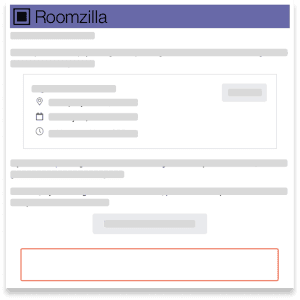
- A greeting
- The main message of the email (e.g., confirmation of a reservation, a reminder about check-in, or a notification that a reservation was rejected)
- If the email is about a reservation, a summary box with reservation details and key action links (e.g., edit, cancel, confirm)
- Only after this comes the custom text you add, making it a great place for additional instructions, policies, or contact information rather than replacing the core content of the email.
- This ensures that important system-generated details remain clear while giving you flexibility to add extra context.
Available Email Templates and When They Are Sent
Below are listed all email templates in Roomzilla, along with their descriptions:
Reservation Emails
- Reservation Creation – Sent when a reservation is successfully created.
- Reservation Creation (Guest) – Sent to a guest when a reservation is created with their email.
- Reminder: Upcoming Reservation – A reminder email sent before a reservation starts.
- Reminder: Check-in Required – Sent when check-in is required for an upcoming reservation.
- Notification: Reservation Auto-Cancelled – Sent when a reservation is automatically canceled due to a missed check-in.
- Reservation Edit – Sent when an existing reservation is modified.
- Reservation Cancellation – Sent when a reservation is canceled.
Approval-Based Reservation Emails (Approval Queue Enabled)
- Reservation Request Creation – Sent when a user submits a reservation request for approval.
- Reservation Request Edit – Sent when a pending reservation request is modified.
- Reservation Request Approval – Sent when a reservation request is approved.
- Reservation Request Rejection – Sent when a reservation request is rejected.
User Account Emails
- Invitation to Roomzilla – Sent when a new user is invited to join Roomzilla.
- Forgot Password – Sent when a user requests a password reset.
- Membership Approval – Sent when an admin approves a user’s membership request.
- Membership Rejection – Sent when an admin rejects a user’s membership request.
Payment Emails
- Payment in Progress – Sent when a payment is being processed for a reservation. (If Reservation Payments are enabled)